


Midtown Comics
3.6201.00 Reviews
App Specs
- Version
- Varies with Device
- Updated On
- License
- Free
- Downloads
- 50,000+
- Developer
- Midtown Comics
- Categories
- Comics
- Platform
- Android
Screenshots
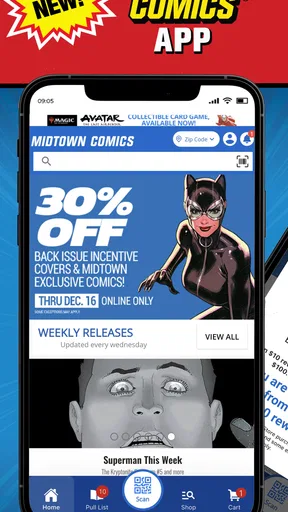
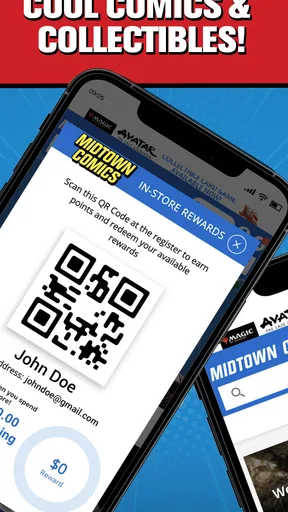
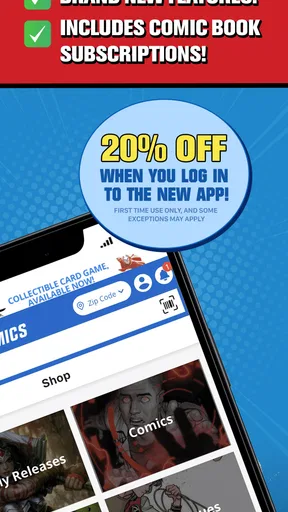
 Analysis by AppCompare
I think a comics app earns a place on a shared household device when it helps different readers browse without turning every visit into a long search. Midtown Comics is aimed at that kind of discovery: it brings a comic-shop browsing experience to a phone, with Midtown Comics as its developer. I would treat it as a convenient place to explore and keep track of interests, rather than assume it will automatically organize a family’s reading habits for everyone.
A browsing stop for different readers
Picture a quiet evening when one person wants to look for a familiar superhero, while another is curious about a series they have heard friends mention. A shared phone can pass between them, and each can use the app to search and explore without needing to start with a specific issue in mind. That casual, browse-first use is where a shop-oriented comics app can be handy: it gives a household a common place to look around, even when its readers have different tastes.
That does not mean it should be treated like a shared reading account with separate personal spaces. I would make a simple household rule before using any shopping app together: browse as a group, but pause before placing an order or changing a list if another person is signed in. That small distinction helps prevent one reader’s plans from being mistaken for another’s. It is especially useful when a younger reader is exploring alongside an adult who handles purchases.
Keep browsing and buying separate
In practical use, I would begin with a specific goal instead of opening the app and hoping a long session will sort everything out. Search for a character, creator, or title that the reader already likes, then use the results as a springboard to nearby interests. If the household is comparing possible purchases, keep a note of the exact series or issue outside the app until the person making the decision has checked it. That habit reduces confusion when several readers are browsing on one device.
For a regular reader, the Pull List described in the app’s feature set can act as a reminder of upcoming issues they want to follow. In a household, I would keep expectations clear about whose interests that list represents; a shared list can be useful for a joint collection, but less helpful when everyone assumes it is personal. Likewise, a pre-order is a buying decision, not simply a bookmark. I would involve the person responsible for the purchase before using it, rather than treating it as a casual tap while exploring.
Age context and trust
The app is rated for Everyone, which makes its general audience positioning easy to understand, but I still would not use an age label as a substitute for choosing comics thoughtfully. Individual stories can differ in tone and subject matter, so a parent or caregiver should help a younger reader decide what fits them. The app can be a starting point for discovery; an adult’s judgment remains important when a title is unfamiliar.
Its average rating is 3.3 from around 730 ratings, so I would go in with measured expectations rather than assume every reader will find it equally smooth. It is free to install, and it has passed 50,000 installs, which gives a newcomer some context about its audience without guaranteeing that it will suit a particular device or reading routine. I would try browsing first and decide whether the app’s approach fits before building a household habit around it.
Worth Reading Before You Choose

EA SPORTS FC Mobile 26 Is a Bigger Football Game, but It Takes Time

Flipboard Shows What News Apps Must Do Beyond the Feed

Switching to Android Auto Means Rethinking Your Driving Routine

Google Calendar Makes a Crowded Week Easier to Manage

Ludo King Makes the Most of the Minutes Between Plans

Baby Panda World Brings Quick Play to Modern Phones, but Its Game Library Feels Busy
Discovering a Universe of Comics
The first thing that strikes you about Midtown Comics is the vast selection. Seriously, it’s like walking into a treasure trove of illustrated stories. From mainstream superhero franchises to indie titles that you might not have heard of, the app seems to have it all. Navigating this world is a breeze, thanks to the intuitive search functions. You can filter by publisher, genre, or even the writer and artist, making it super easy to find exactly what you’re looking for.
User-Friendly Interface
I’ve used a few comic apps before, and let me tell you, some of them feel like trying to solve a Rubik’s cube. Not this one! The interface is clean and straightforward. The menu is clear, and the layout is designed for ease of use. A couple of taps, and you’re browsing your favorite titles or discovering new ones. Plus, the app’s performance is snappy, so you’re not left hanging while waiting for pages to load.
Features That Stand Out
Now, onto the features. One of my favorite things is the ‘Pull List’ feature. It’s like having a personal assistant for your comics. You can add upcoming issues to your list, and the app will notify you when they’re available. No more missing out on that special edition cover! The app also offers discounts and exclusive deals, which is a nice touch if you’re a frequent buyer like me.
Another cool feature is the pre-order option. You can secure your copy of an upcoming release without the fear of it selling out. And for those of us who love a good comic marathon, the app lets you download comics for offline reading. Perfect for those long commutes or flights where internet is spotty at best.
The Reading Experience
Reading on Midtown Comics is a delight. The app provides a smooth, immersive reading experience. You can zoom in on panels without losing clarity, and the pages turn with a satisfying swipe. It’s almost like holding a physical copy, minus the paper cuts. The reading modes are customizable too, so whether you prefer single-page views or scrolling through entire issues, they’ve got you covered.
Community and Connection
One of the unexpected joys of this app is the sense of community it fosters. There’s a section for news and updates, keeping you in the loop with the latest in the comic world. Plus, you can connect with other fans through reviews and discussions, sharing your thoughts and recommendations. It’s like having a mini comic convention at your fingertips, anytime you want.
Where it fits among comic apps
I see this as a shop-led option rather than a neutral digital library. That distinction matters when choosing between a retailer’s app, a dedicated comics reader, and a local comic shop. A dedicated reader may be the better fit if your priority is a consistent reading workflow across a collection you already own. A local shop can offer personal recommendations and the pleasure of browsing physical shelves. Midtown Comics makes more sense when you want discovery and shopping to sit close together, especially if you already enjoy following new releases.
That also changes how I would use its reading tools. Downloading for offline reading is useful when I know I will be away from a reliable connection, but I would prepare before leaving rather than assume a title will be ready at the last minute. If I am deciding whether a series is worth continuing, I would read a sample or check the issue details before committing to a purchase. Treating browsing, buying, and reading as separate steps makes the app less impulsive and more useful.
Small habits that make it more useful
One practical tip is to search by a creator’s name when a familiar character search returns too many possibilities. A writer or artist can lead to work outside the reader’s usual franchise and make discovery feel more intentional. For a household that shares recommendations, it can also help to say why a title caught someone’s attention—an artist, a character, or a continuing storyline—rather than simply adding it to a common list and expecting everyone to remember the reason.
Another useful trade-off is notification management. A Pull List reminder can help a regular reader keep up, but reminders are only valuable when the list is current and belongs to the person who wants them. I would review it occasionally and remove issues that no longer interest me, especially if several people take turns using the device. Otherwise, a handy prompt can become background noise, and the list stops reflecting anyone’s real plans.
Who will get the most from it
I would recommend trying the app if you enjoy browsing comics, follow ongoing series, or like having a route from discovering a title to considering a purchase. It is also a reasonable starting point for someone who knows a character but has not yet found a preferred writer, artist, or series. A casual reader can use it to explore at their own pace, while a more committed fan may appreciate keeping upcoming issues in view.
I would skip it if what you mainly want is a quiet, retailer-independent reading space, or if you are looking for a simple way to manage several people’s separate collections. In those cases, a dedicated reader or a clearly divided household system may suit you better. It is also not a substitute for checking whether a story fits a younger reader; a general age rating does not tell you the tone of every individual comic.
What to expect before settling in
New users may wonder whether the app is only for browsing or also supports reading. Its described features cover both shopping-oriented tools, such as pre-orders and a Pull List, and digital reading, including offline downloads and adjustable views. I would still approach each title individually: first locate it, then check that it is the right issue or edition, and only then decide whether to add it to a list, order it, or read it. That sequence is more reliable than assuming every comic discovery should lead to an immediate purchase.
Another reasonable question is whether it works well for readers who do not know comic-book publishing jargon. Search by a familiar character or creator, then narrow the results using the available filters; that is less intimidating than trying to understand a whole publishing line at once. For a household, the same approach gives a younger or newer reader a manageable first step while an experienced fan can help explain how issues and series connect.
Final Thoughts
So, is Midtown Comics worth a download? Absolutely, if you’re a comic book enthusiast or even just a casual reader looking to explore new stories. Its extensive library, user-friendly interface, and fantastic features make it a standout choice. Whether you’re a Marvel fanatic, a DC devotee, or an indie explorer, this app is a must-have. Dive in and discover your next favorite series!
My household verdict is a little more specific: I would use it as a shared discovery tool, while keeping purchase decisions and personal reading plans clear. The app’s shop-first character, reminders, and reading options give comics fans several reasons to return, but they work best when each person knows what they are adding and why. If you want to explore Midtown Comics’ catalog on a phone and are comfortable keeping those boundaries in mind, it is worth a try; if separate profiles or a purely library-focused experience are essential, I would choose another approach.
Pros
- Extensive comic catalog with latest releases.
- User-friendly interface for easy navigation.
- Customizable reading preferences and modes.
- Offline reading for on-the-go access.
- Regular updates and new content additions.
Cons
- Occasional app crashes on older devices.
- Limited search functionality for niche comics.
- In-app purchases can be pricey for collectors.
- Requires stable internet for seamless updates.
- Some users report slow download speeds.
FAQs for Midtown Comics
What features does the Midtown Comics app offer?
The Midtown Comics app allows users to explore a vast collection of comics, including the latest releases and classic titles. It features a user-friendly interface for browsing and purchasing, personalized recommendations, and a subscription service for regular updates. Additionally, users can track their orders and access exclusive offers and discounts.
Is the Midtown Comics app free to use?
Yes, the Midtown Comics app is free to download and use. However, purchasing comics and subscribing to certain features may require payment. The app offers in-app purchases for individual comics, bundles, and subscription services that provide access to exclusive content and deals.
Can I download comics for offline reading?
Currently, the Midtown Comics app does not support offline reading for downloaded comics. Users need an active internet connection to browse and read their purchased or subscribed content. This feature ensures that users always have access to the latest updates and content available on the platform.
How does the subscription service work in the Midtown Comics app?
The subscription service in the Midtown Comics app allows users to sign up for regular updates on their favorite comic series. Subscribers receive alerts for new releases and can access exclusive content and discounts. The subscription can be managed directly through the app, where users can adjust their preferences and cancel at any time.
Is customer support available through the Midtown Comics app?
Yes, the Midtown Comics app offers customer support to assist with user queries and issues. Users can access support through the app’s help section, where they can find FAQs, contact details, and submit requests for assistance. The support team is responsive and aims to resolve issues promptly.


